Yano Wallet Preview
Yano Wallet (opens in a new tab) is a desktop Cardano wallet designed for your custom devnet. Connect it to a Yaci DevKit devnet to test your dApp with a real wallet: create or restore accounts, send ADA and tokens, and approve CIP-30 requests from your dApp in the browser.
Yano Wallet is a preview release and should be used only on devnets and test networks.
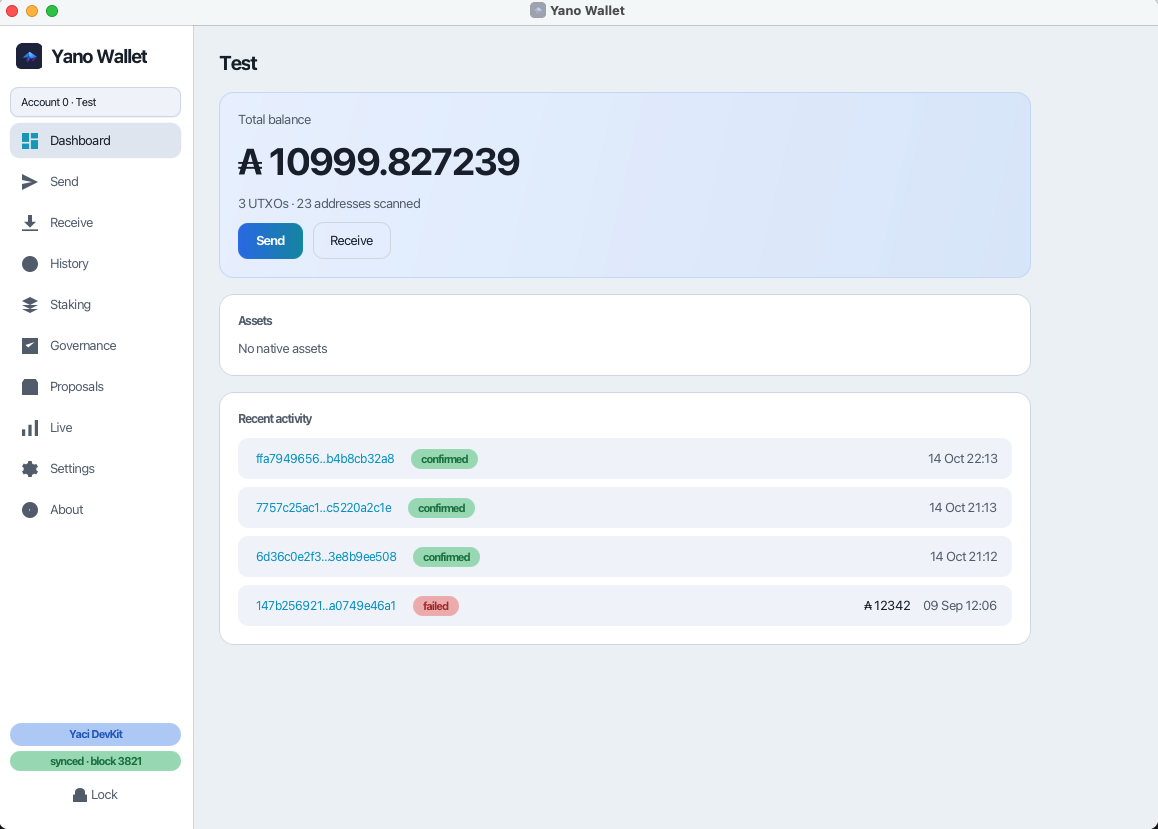
What you get
- Create or restore wallets, with multiple accounts
- Send and receive ADA and native assets, staking, and governance voting
- A CIP-30 dApp connector: a browser extension that injects
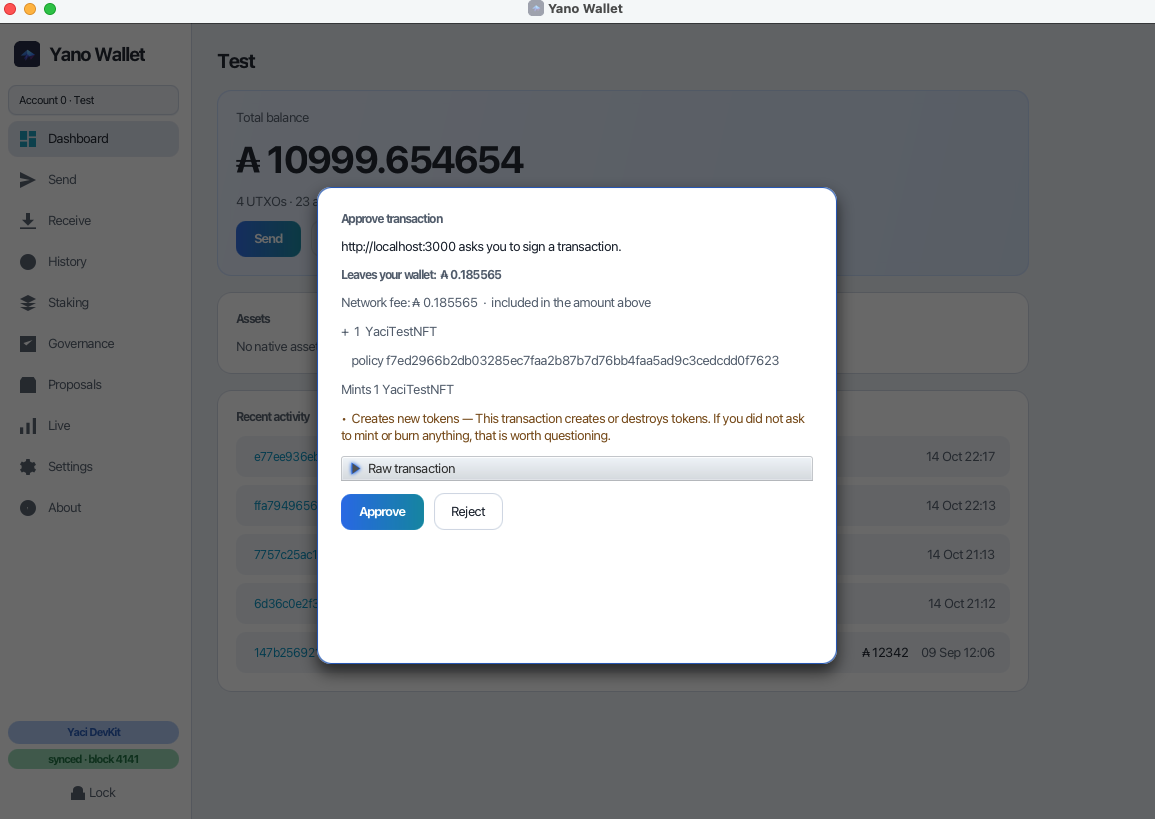
window.cardano.yanoand hands each request to the wallet for approval - Simulate before you sign: the approval prompt shows what a transaction does to your wallet, such as the ADA that leaves it and the tokens it mints, before you sign
- Transaction hashes link to Yaci Viewer at
http://localhost:5173. See Yaci Viewer for how to get it
How it connects
On other networks Yano Wallet runs its own Yano node. With Yaci DevKit it doesn't: it talks to the devnet's
Yaci Store over its Blockfrost-compatible API at http://localhost:8080/api/v1. Yaci Store must be running.
| Setting | Value |
|---|---|
| Network | Yaci DevKit (protocol magic 42) |
| Backend | External, Yaci Store |
| Default URL | http://localhost:8080/api/v1 |
A browser dApp reaches the wallet through two pieces you install once: the Yano Wallet Connector extension in the browser, and the Native Messaging host that the wallet registers with the browser.
dApp (window.cardano.yano) → Yano Wallet Connector extension → Native Messaging host → Yano Wallet → Yaci StoreSet up the wallet
Start a devnet with Yaci Store
The command depends on how you installed Yaci DevKit.
yaci-devkit up --enable-yaci-storeInstall Yano Wallet
On an Apple Silicon Mac:
brew install --cask bloxbean/tap/yano-walletFor Linux, Windows and Intel Macs, download the latest build from the releases page (opens in a new tab). The Getting Started guide (opens in a new tab) explains which file to pick.
Connect to the devnet
On the wallet's Connect screen, choose the Yaci DevKit network. The wallet switches to an external backend and
fills in http://localhost:8080/api/v1. Change the URL if Yaci Store runs on another port, then click Start.
When it is connected, the bottom of the sidebar shows Yaci DevKit and synced · block N.
Create a wallet and fund it
Create a new wallet, or restore a test wallet. Copy a receiving address from Receive, then top it up from the Yaci CLI:
topup <address> 1000You can also use the admin API at http://localhost:10000. See Yaci CLI commands.
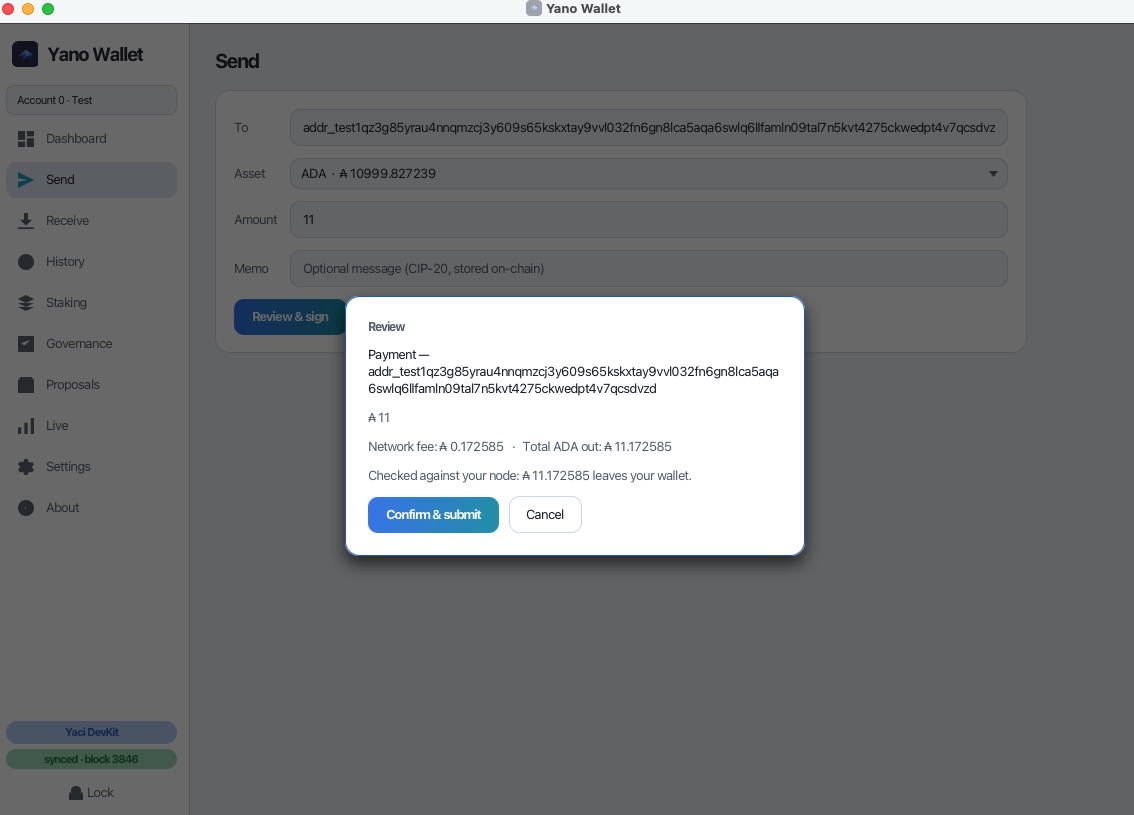
The wallet is now ready to send and receive on the devnet. Before it submits a payment, it shows what will leave your wallet:
Connect a dApp (CIP-30)
To let a browser dApp use Yano Wallet, install the connector extension and the Native Messaging host. Both are one-time steps. They work in Chrome, Chromium, Edge and Brave.
Load the connector extension
The extension is not on the Chrome Web Store yet, so load it unpacked in developer mode:
- Download
yano-connector-<version>.zipfrom the Yano Wallet releases page (opens in a new tab), from the same release as your wallet, and unzip it. You get a folder withmanifest.jsondirectly inside it. - Open
chrome://extensions(oredge://extensions,brave://extensions). - Turn on Developer mode (top right).
- Click Load unpacked and select the unzipped folder.
The extension appears as Yano Wallet Connector. Keep the folder where it is: the browser loads an unpacked extension from that path every time it starts.
Install the Native Messaging host
The extension doesn't talk to the wallet over the network. The browser starts a small relay that the wallet installs, and the relay passes messages to the wallet over a local socket.
- In Yano Wallet, open Settings → Browser connector.
- Click Install browser connector (Native Messaging).
- Quit and restart the browser. Browsers read this registration only at startup.
Run this step again if you move the wallet, upgrade to a build in a different folder, or switch between the native and JVM builds, because the registration points at an exact path on disk.
Connect from your dApp
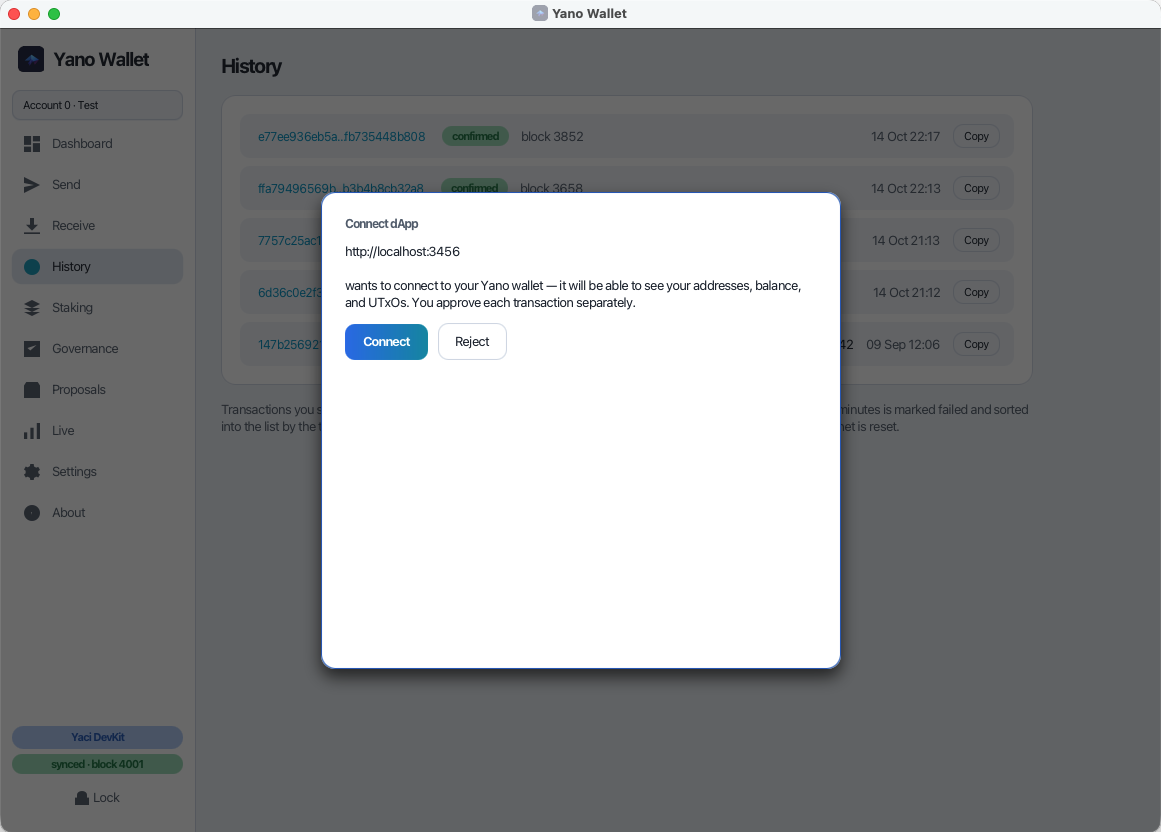
With the wallet running and unlocked, open your dApp and choose Yano in its wallet list (or call
window.cardano.yano.enable()). The wallet asks you to approve the connection:
Approve transactions
Each transaction the dApp asks to sign opens an approval prompt in the wallet. It shows what leaves your wallet, the network fee, the tokens minted or received, and warnings such as "Creates new tokens":
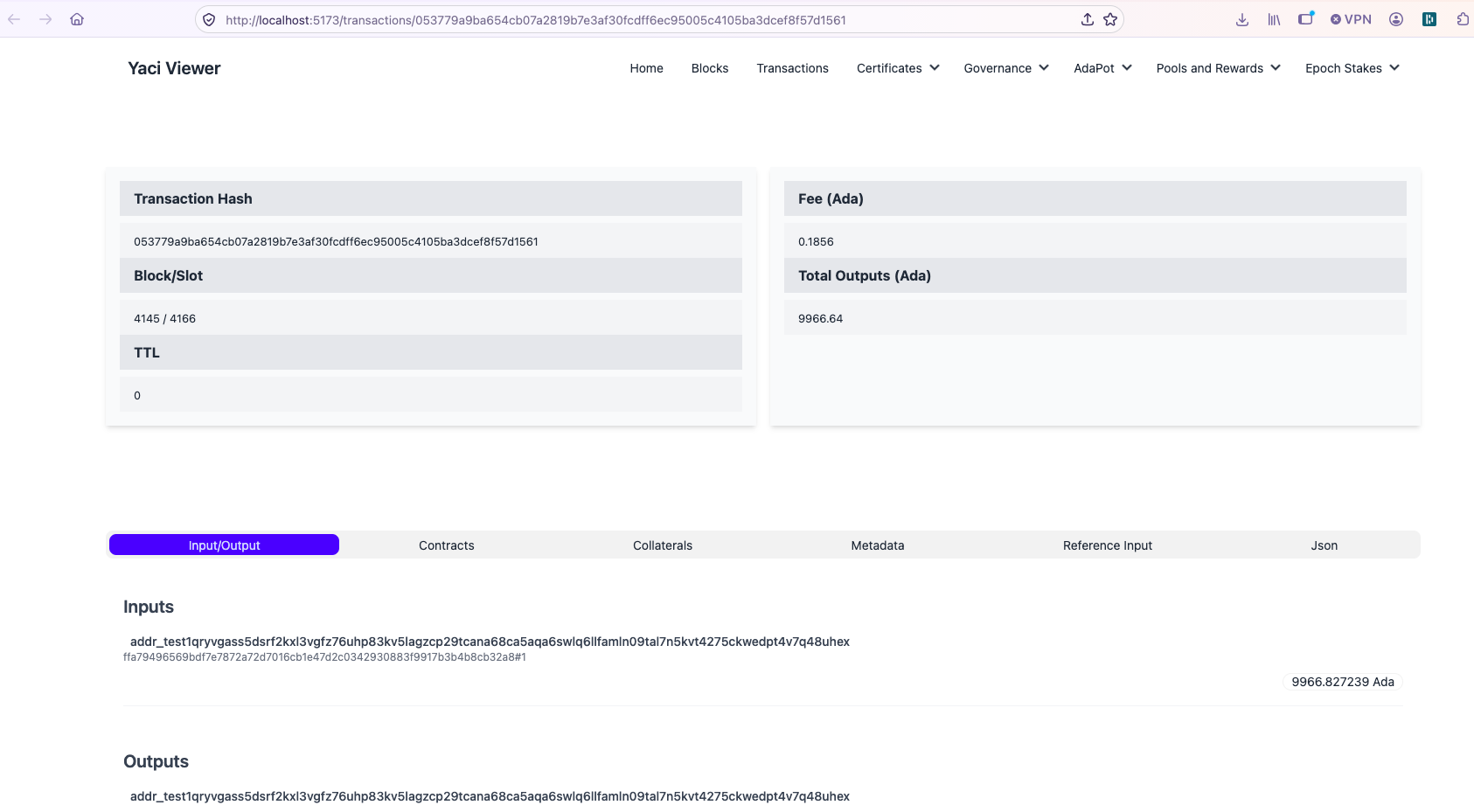
Click a transaction hash in the wallet's History to open it in Yaci Viewer:
Every Cardano test network reports CIP-30 networkId 0, so a dApp can't tell a devnet from Preprod by the network
id alone. Make sure your dApp and the wallet point at the same devnet.
Yaci Viewer (optional)
The wallet doesn't need Yaci Viewer. It only opens Yaci Viewer when you click a transaction hash.
-
Docker: Yaci Viewer is included at
http://localhost:5173. -
Homebrew, npm and Zip: install it separately with npm, and start it on port 5173 while the devnet is running. The npm package listens on port 3000 unless you set
PORT, and the wallet's links expect 5173.npm install -g @bloxbean/yaci-viewer PORT=5173 yaci-viewerSee Install Yaci Viewer.
Yano Wallet or the built-in CIP-30 wallet?
Yaci DevKit also ships a CIP-30 wallet at http://localhost:10000/wallet. Use it for automated tests
and quick checks: it needs no install and uses the devnet's pre-funded accounts. Use Yano Wallet when you want to test
with a real wallet and the approval flow your users will see.
Troubleshooting
- The wallet can't connect to the devnet. Check that Yaci Store answers at
http://localhost:8080/api/v1/blocks/latest. - The dApp doesn't list Yano. Check that Yano Wallet Connector is enabled at
chrome://extensions, then reload the dApp page. - "Yano wallet is not reachable — is it running and unlocked?" Unlock the wallet. If it is unlocked, run Install browser connector (Native Messaging) again and restart the browser.
- Balances look wrong after resetting the devnet. A reset starts a new chain. Top up the address again.
More help is in the Yano Wallet Getting Started guide (opens in a new tab).